A live activity surface docked to the MacBook notch.
Normally just a black notch — invisible to your workflow. When Claude Code, Codex or Gemini has something happening (waiting, working, awaiting approval), it expands. Hit Return to land in the exact terminal tab.
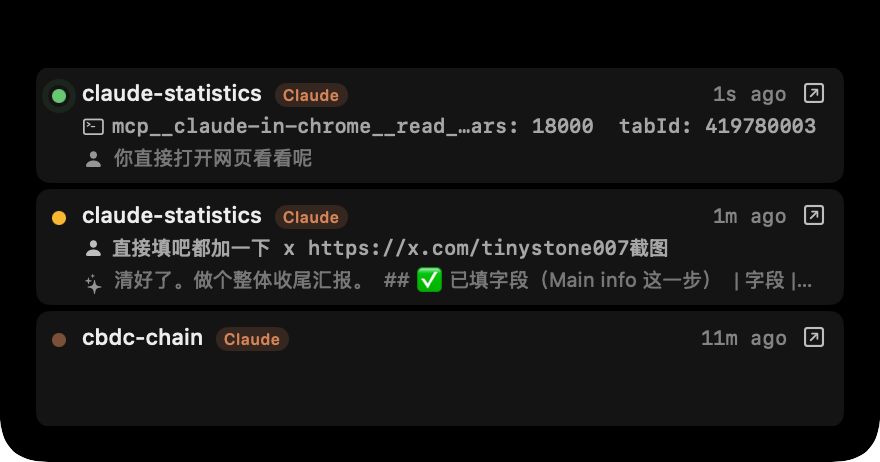
Active sessions list
Every running session grouped by project, with live status: waiting / working / awaiting approval. Updates in real time as hooks fire.
Inline permission cards
Claude Code permission requests surface as Allow / Deny cards. Decisions are written back through the hook protocol — you never touch the terminal.
Tab-accurate focus return
Click a card or hit Return to land in the session's exact terminal tab — Ghostty surface id, iTerm2 tty, Terminal tab all handled.
How it works
Notch Island is driven entirely by hooks. Claude Statistics installs hooks into ~/.claude/settings.json, ~/.codex/hooks.json and ~/.gemini/settings.json — events flow back as JSON over stdin.
- 01 Hook events PreToolUse, PostToolUse, Notification, Stop, PermissionRequest and others — each carries the session id, project path and the relevant tool call.
- 02 State aggregation The app collapses raw events into a session view: waiting on user, working on tool, awaiting approval, idle, done.
- 03 Approval round-trip An Allow / Deny tap writes a JSON decision back through the hook stdin protocol. Claude resumes immediately.
Where it shines
-
✦
Run three sessions in parallel When session A wants approval, the notch lights up with the command; one tap lets it run, you stay in session B.
-
✦
Glance away, come back Walk to the kitchen, glance at the notch from across the room — green dots mean waiting on you, amber means still working.